
AWS Lambda Web Functions: Run Node.js Web Apps Without Managing Servers
A practical guide to running Node.js web applications and API backends on serverless infrastructure.
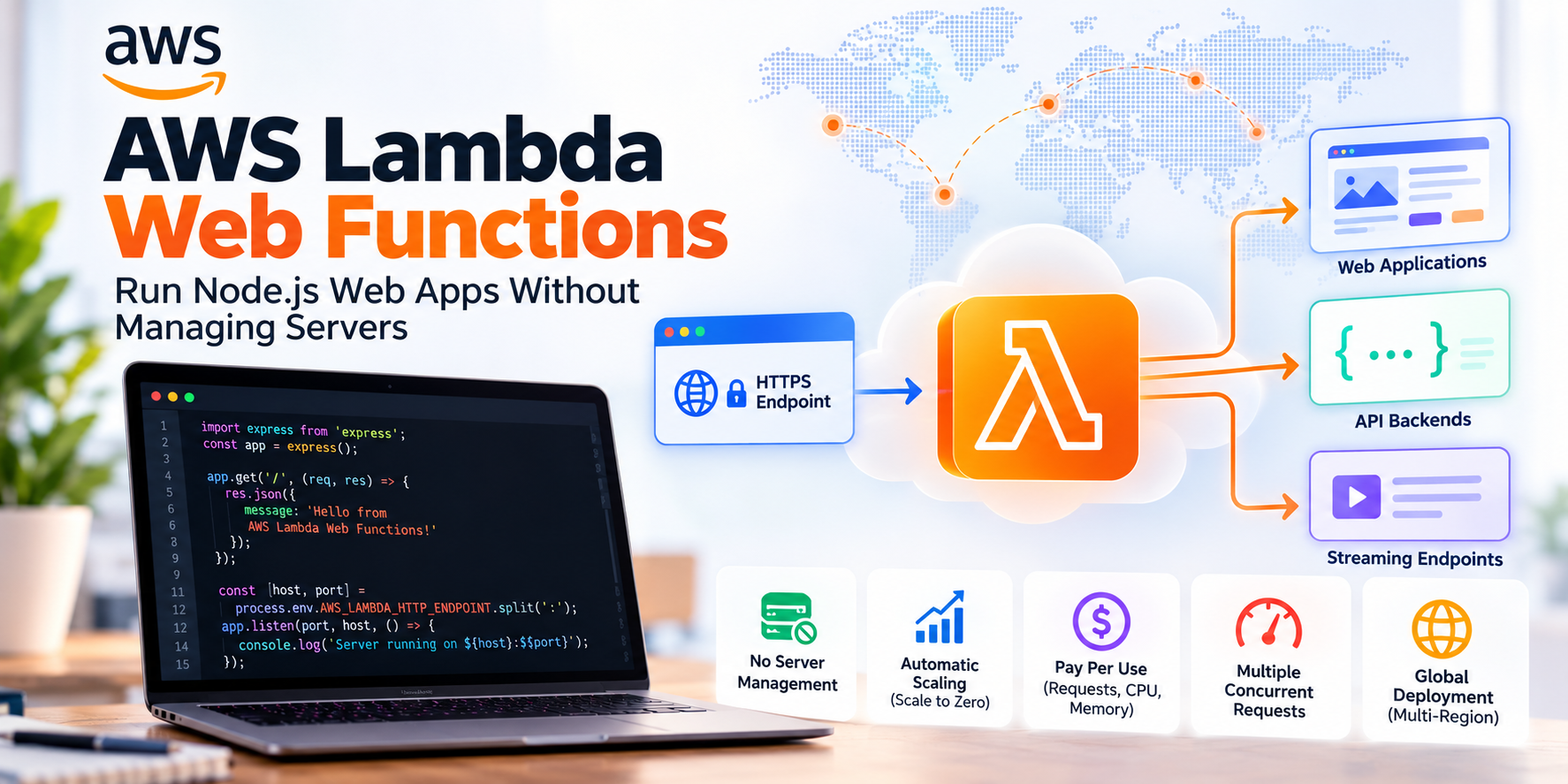
On October 12, 2026, AWS announced AWS Lambda Web Functions, a new way to run web applications and API backends on AWS Lambda. The idea is straightforward: instead of restructuring a web application around Lambda’s traditional event-handler model, developers can run a standard Node.js HTTP server directly on Lambda.
For developers working with frameworks such as Express, Hono, or Fastify, this is a meaningful change. You can use a familiar web development model, deploy your application as a package, and let AWS manage the infrastructure, HTTPS endpoint, and scaling.
The important part is not simply that AWS has introduced another serverless feature. It is that Lambda now supports a more natural programming model for applications that continuously handle HTTP requests.
What Are AWS Lambda Web Functions?
AWS Lambda Web Functions let you run a standard HTTP server on managed, serverless infrastructure. Your application listens on a network port and processes incoming HTTP requests just as it would when running on a conventional server.
Previously, developers building HTTP applications on Lambda commonly used a handler-based approach, often with Amazon API Gateway, Lambda function URLs, or an adapter to connect a conventional web server to Lambda’s execution model. These approaches remain useful, but they can introduce additional configuration or require developers to work within a different request-handling model.
Web Functions offer another option. Instead of writing a Lambda handler for each incoming request, you can deploy a conventional Node.js server and use the web framework you already know.
AWS manages the execution environments, creates an HTTPS endpoint, and scales the application according to incoming traffic. Applications can also scale down to zero when they are idle.
For further reading, see the official AWS announcement.
How Do Lambda Web Functions Work?
Understanding the architecture is easier if we break it into four parts.
1. Your application
You develop a regular Node.js web application. You can use familiar frameworks and application structures instead of converting every HTTP request into a Lambda event and response. For example, an Express application can expose routes such as /api/devices, /api/users, and /health. The application starts an HTTP server and listens on the host and port supplied through the AWS_LAMBDA_HTTP_ENDPOINT environment variable.
2. Execution environments
Lambda runs your application inside managed execution environments. Unlike the traditional Lambda event model, where an execution environment generally processes one invocation at a time, a Web Functions environment can handle multiple concurrent HTTP requests.
This makes the programming model closer to that of a conventional Node.js server. It also changes how applications should be designed. Developers must account for multiple requests being handled by the same process at the same time, particularly when managing shared objects, authentication information, and request-specific data.
3. Endpoints
Lambda creates an HTTPS endpoint through which clients can reach the application. TLS is provided for the endpoint, and developers can configure authentication, traffic limits, and routing.
A frontend application could call the endpoint to retrieve production information from an API backend. A custom domain is not attached directly to a Web Function endpoint. If you need a custom domain, Amazon CloudFront can sit in front of the endpoint.
4. Revisions and deployments
A Web Function uses immutable revisions. Each revision captures a particular version of the application code and its configuration.
An endpoint directs traffic to a revision. For production deployments, you can control traffic distribution between revisions, test a new version with a small percentage of requests, and return traffic to an earlier revision if the new version causes problems. This is useful when deploying changes to applications that must remain available while new code is introduced.
For more detail, refer to the AWS Lambda Web Functions documentation.
A Simple Example Using Express.js
One of the most practical aspects of Lambda Web Functions is that the application code resembles an ordinary Express server. Consider this example:
import express from "express";
const app = express();
const [host, port] =
  process.env.AWS_LAMBDA_HTTP_ENDPOINT.split(":");

app.use(express.json());

app.get("/", (req, res) => {
  res.json({
    message: "Hello from AWS Lambda Web Functions!"
  });
});

app.get("/health", (req, res) => {
  res.status(200).json({ status: "healthy" });
});

app.get("/api/devices/:id", (req, res) => {
  res.json({
    deviceId: req.params.id,
    status: "online"
  });
});

app.listen(port, host, () => {
  console.log(`Server listening on ${host}:${port}`);
});
This example provides a home route, a health-check endpoint, and a simple device API. The key detail is the server startup configuration. Lambda supplies the AWS_LAMBDA_HTTP_ENDPOINT environment variable, and the application must listen on the specified host and port.
To run the application locally, you can set the same variable yourself. For example:
AWS_LAMBDA_HTTP_ENDPOINT=127.0.0.1:3000 node index.js
The rest of the application follows the standard Express programming model. This does not mean an application requires no preparation before deployment. Dependencies must be installed and packaged correctly, and the application must respect Lambda’s runtime, networking, and concurrency requirements. But developers do not need to introduce a Lambda-specific request-handler adapter simply to use this programming model.
Deploying Your First Web Function
AWS provides a dedicated command-line workflow for deploying Web Functions. Once your Node.js application is ready, a basic deployment command looks like this:
aws lambda-web deploy --name hello-world --code ./my-app
The AWS CLI deployment workflow can package the application, create the Web Function, publish an initial revision, configure an endpoint, and return its HTTPS address. You can then test the endpoint using a browser or an HTTP client such as curl.
curl https://your-web-function-endpoint/
The exact endpoint address will be generated by AWS. For a production deployment, the initial successful response should be treated as only the first test. Developers should also validate authentication, environment variables, access to downstream services, error handling, and behavior under concurrent requests.
AWS documents the full process in its Web Functions deployment guide.
Key Benefits of AWS Lambda Web Functions
1. A familiar web development experience
Developers can build applications around a conventional HTTP server instead of adapting the application to a function-handler model. This can make it easier to develop, test, and maintain applications that already use standard Node.js frameworks. Teams can also reuse existing knowledge of routing, middleware, request validation, and response handling.
2. Multiple concurrent requests per environment
Traditional event-driven Lambda functions are usually associated with one invocation at a time per execution environment. Web Functions can process multiple concurrent HTTP requests within an environment. This can help make better use of warm execution environments, especially when a web application receives bursts of requests or spends significant time waiting for database queries and external APIs.
Concurrency does not mean every application will automatically become faster. A poorly designed application can still experience high latency because of CPU-intensive work, database connection limits, event-loop blocking, or contention over shared resources.
3. Automatic scaling, including scale-to-zero
AWS manages the number of execution environments needed to serve incoming traffic. When traffic increases, it can add environments; when demand falls, it can remove environments that are no longer needed. When an application is idle, it can scale down to zero environments.
That is particularly useful for development environments, internal tools, APIs with irregular demand, and applications that experience large variations in traffic. There is one trade-off: a request arriving after a period of inactivity may need to wait while a new execution environment starts. Applications with strict latency requirements should measure this behavior under realistic traffic rather than assume that every request will have identical response times.
4. Usage-based compute billing
Web Functions introduce a billing model based on the number of requests, active CPU time, memory consumed over the lifetime of execution environments, and applicable data-transfer charges. An important distinction is that CPU time spent waiting for a database or an external API is not billed as active CPU time. This can be attractive for API backends that perform relatively little computation but spend much of their time waiting on I/O.
However, memory charges can continue while an execution environment exists, including during idle periods between requests. Requests, memory consumption, active CPU usage, and traffic patterns all affect the overall bill. It would be misleading to assume that Web Functions are automatically cheaper than EC2, containers, or traditional Lambda functions. Cost comparisons should use actual workload measurements.
See the official AWS Lambda pricing page for current rates and billing details.
5. Response streaming
Web Functions support response streaming, allowing applications to send output as it becomes available instead of waiting for the complete response. This can improve the experience of applications that generate content incrementally, such as AI-powered applications that stream generated text to a browser. It can also be useful for other HTTP workloads where delivering the first part of a response early is more important than waiting for the entire payload.
6. Multi-Region deployments
For applications serving users in different parts of the world, Web Functions support deployment across multiple AWS Regions. With a MultiRegion endpoint, AWS can use latency-based routing to direct requests to a Region expected to provide a lower-latency response. Other regional endpoint configurations are available when developers need to control routing themselves.
Multi-Region deployment can improve the user experience, but it is not a complete disaster-recovery strategy by itself. Application data, secrets, permissions, and downstream dependencies must also be available and correctly configured in the Regions serving traffic.
Where Can You Use Lambda Web Functions?
Web Functions are most relevant when the workload naturally operates as an HTTP server.
Web applications and server-side rendering: Applications that render pages dynamically can run their production server directly on Lambda. This is useful when pages contain personalized or frequently updated content.
REST and GraphQL APIs: Applications that provide APIs to mobile apps, web frontends, and other services can use standard Node.js routing and middleware.
Microservices: Small HTTP services can scale independently according to demand without requiring a dedicated server fleet to be provisioned and maintained.
AI and streaming applications: An application can expose endpoints that communicate with AI services and progressively stream results to clients.
Internal business applications: Administrative portals, dashboards, and internal tools with variable traffic may benefit from managed scaling and reduced infrastructure administration.
For example, imagine an industrial monitoring platform that manages devices, machines, and production information. A Node.js Web Function could expose APIs for retrieving machine status, user preferences, and production summaries. It could query an appropriate database or call other AWS services to retrieve the required information.
That API could scale with user demand while separate event-driven functions handle background work, such as processing uploaded files, consuming queued messages, or responding to IoT events. Web Functions do not replace every other Lambda workload. They add another option for the parts of an application that serve HTTP traffic.
Lambda Web Functions vs. Traditional Lambda Functions
The difference is mainly the programming model and how each workload is executed.
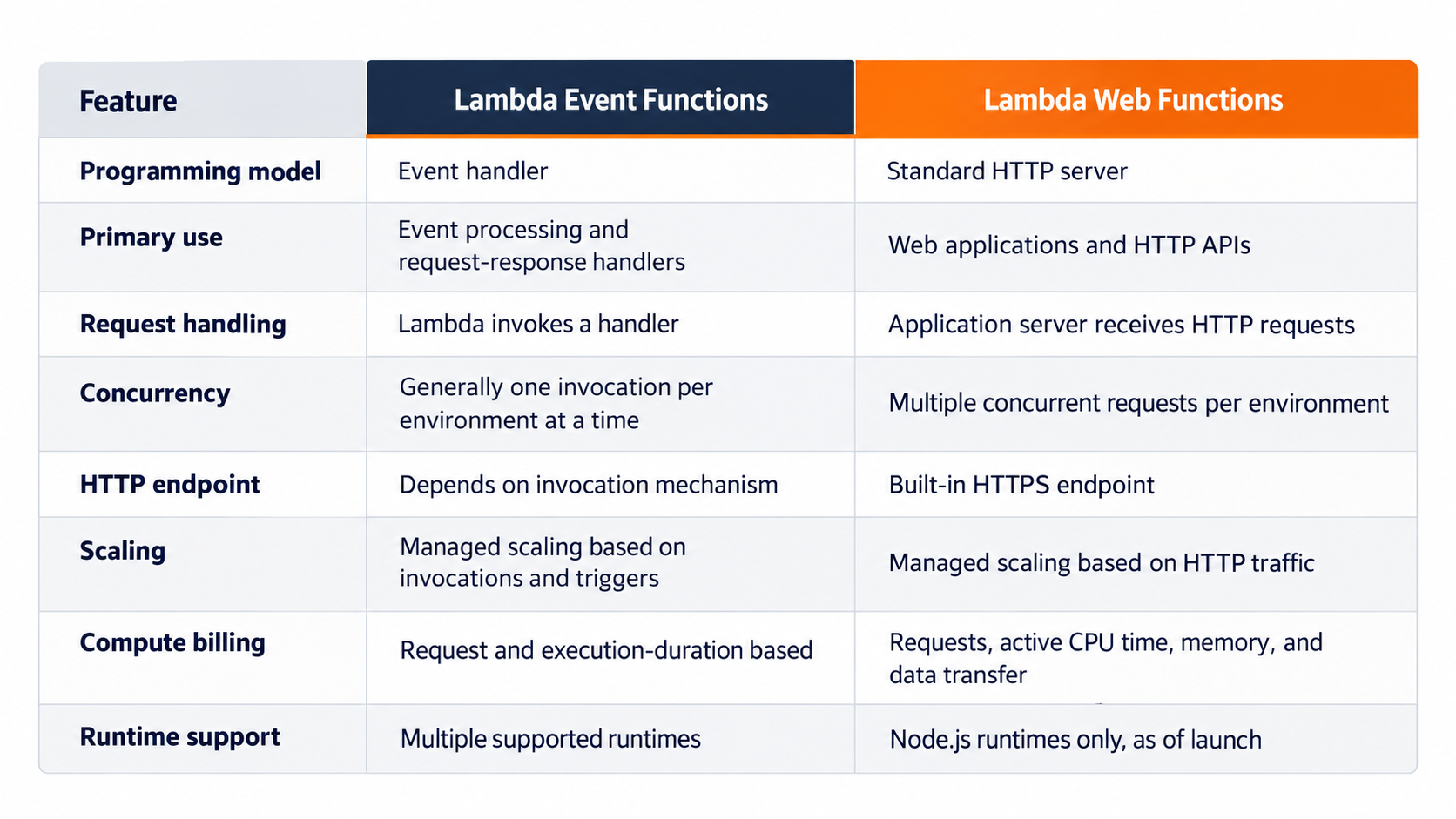
Neither model is universally better. Choose Event Functions when the workload is naturally event-driven, such as processing SQS messages, reacting to an S3 upload, or consuming a stream. Choose Web Functions when the application is fundamentally an HTTP server and you want to use a standard web framework directly. In a larger system, using both models together may be the most sensible approach.
Security Considerations You Should Not Ignore
A managed HTTPS endpoint does not automatically make an application secure. Web Functions offer two endpoint authentication modes.
IAM authentication (IamAuth)
Lambda authenticates and authorizes requests using AWS IAM. Callers generally need to sign their requests using AWS Signature Version 4, or Signature Version 4a for applicable Multi-Region endpoints. This can be suitable for service-to-service communication and controlled access between trusted AWS identities.
Application-managed authentication (ApplicationManaged)
Lambda forwards requests to the application without authenticating or authorizing the caller. Your code must validate users, tokens, permissions, and access to individual resources.
This second mode needs particular care. If the endpoint is configured this way, knowing the endpoint address may be enough to reach the application. Authentication must be implemented properly in the application or enforced through a suitable front-door architecture.
For production systems, developers should:
Apply least-privilege IAM permissions to execution roles.
Validate request data and enforce authorization for protected operations.
Store secrets in a managed secret store rather than in deployment packages.
Avoid writing tokens, passwords, or sensitive customer data to logs.
Put CloudFront in front of the endpoint when custom domains, caching, or AWS WAF protection are required, and configure the origin so clients cannot bypass the intended controls.
Important Limitations to Understand
Web Functions are promising, but they are not a universal replacement for conventional application hosting.
First, the initial release supports Node.js runtimes only. Teams using Python, Java, .NET, or other languages should not assume that their existing applications can be deployed to Web Functions unchanged.
Second, an endpoint does not directly support a custom domain. A service such as CloudFront is needed when an application must be exposed through its own domain.
Third, scale-to-zero introduces a possible initialization delay when traffic resumes. This matters for applications with strict latency objectives.
Fourth, concurrency must be considered carefully. Shared mutable state, global objects containing user-specific information, and database connection pools can behave differently when several requests use the same process concurrently. Keep request-specific data isolated and test connection management under load.
Finally, application limits and downstream capacity still matter. Lambda can scale execution environments, but it cannot remove the connection limits of a database or make an external API respond faster. Appropriate concurrency limits, request-rate controls, timeouts, and retry policies remain important.
Check the official Web Functions documentation before designing a production deployment.
Best Practices for Production Deployments
A successful deployment is not just a working endpoint. It needs to remain reliable when real users, failures, and traffic spikes arrive.
Start with realistic load tests
Measure response time, memory use, CPU consumption, error rates, and the behavior of downstream services. Test simultaneous requests rather than testing only one request at a time.
Use controlled deployments
Publish immutable revisions and use traffic weights to validate new releases before routing all production traffic to them. Define rollback conditions before deploying.
Monitor application behavior
Track request volume, latency, HTTP errors, throttling, active execution environments, and downstream failures. Use structured logs with request identifiers so you can trace a failure from the client to the server.
Protect downstream services
Set appropriate concurrency and request-rate limits where needed. Retrying requests can help recover from transient failures, but retries should use backoff and jitter, and write operations should be protected against duplicate execution.
Keep application state outside the execution environment
Use a suitable database or other managed storage service for persistent business data. Do not treat a reused process or a global variable as a reliable session store.
Test the complete deployment
Local framework tests are useful, but cloud testing is still needed to validate authentication, permissions, deployment configuration, scaling, networking, and logging.
These practices matter just as much with a new serverless programming model as they do with conventional servers.
Final Thoughts
AWS Lambda Web Functions are an important addition to the Lambda platform because they make it more straightforward to run conventional HTTP applications without managing a fleet of servers.
The strongest reasons to consider them are the familiar Node.js programming model, support for concurrent HTTP requests within execution environments, automatic scaling, built-in HTTPS endpoints, and usage-based compute billing.
The decision should still be based on the workload. Event Functions remain a natural choice for asynchronous processing and event-driven automation. Web Functions make more sense when the application is primarily a web server or HTTP API.
For developers evaluating serverless architectures, the practical next step is to deploy a small application, test its concurrency and authentication behavior, measure performance under realistic traffic, and compare the resulting cost with the architecture already in use.
The biggest benefit is not that every application must move to Web Functions. It is that AWS Lambda now offers another way to build web applications, one that aligns more closely with how many Node.js developers already work.